700.000+ Downloads!
Meet Joomla Gallery
Image Joomla Gallery is responsive, intuitive and simple Joomla gallery extension for creating the awesome photo galleries on your website. Rich functionality of Joomla gallery component will allow you to create a Photo Joomla gallery of any complexity: 6 gallery layouts, 12 hover effects, Fancybox 3, watermark, "Load More" button, support HTML/CSS, Youtube/Vimeo, Sharing, Download buttons and free support.
For whom is our Photo Joomla gallery?
It is perfect for any type of sites: for photographers, artists, personal websites, corporation websites, blog websites, eCommerce and etc. We constantly update the OrdaSoft Responsive joomla gallery, we provide new opportunities, so that you can use only the best and modern component. So choose your photo Joomla gallery version (Free or Pro) and stay tuned!
Most Powerful Features of Joomla Gallery
 New image hover effects
Choose a perfect hover effect. 12 different and creative effects for youre gallery
Navigation Arrows
Switch between images even more easily with the new navigation arrows. You don't need to close image settings and open it again, switch in just one click.
Joomla 5 Support
Joomla 5 is out and it means that Joomla Gallery is updating on Joomla 5!
Joomla Gallery Layouts
Choose among 6 beautiful layouts (Default, Album, All in one etc.) which will suit the best.
Image Thumbnail
For more comfortable working with the gallery, now you can see the image on the right side of setting list.
Load speed optimization for backend and frontend
We have client with 1000+ images in one photo gallery and at one web page.
Gallery Shortcode
Now you may insert to other Joomla content not only Joomla gallery with all images. With the help of Joomla Gallery shortcode may insert 1 image, some images or images category.
Multi language
Now you may add image title or image description to joomla gallery using multilanguage
Images Ordering
Now you can order images in joomla gallery with Drag & Drop, By Title, By uploaded date, By file name
FancyBox 3
FancyBox 3 is a jQuery lightbox script for elegant displaying images, videos and other content. It supports TOUCH.
HTML/CSS Support
You can create your own style for image's presentation with the help of HTML & CSS in Joomla Photo Gallery and add video/audio files, buttons etc.
Share buttons
You have the opportunity to share your favorite images on social networks. We added the buttons: Facebook, Instagram, Twitter, LinkedIn, VK and Odnoklassniki.
Responsive
OrdaSoft image Joomla gallery is fully responsive for different screen sizes. Your users may see the Image Joomla Gallery with any device they want.
Watermark
Designate a text or image watermark and apply this watermark to your images in responsive Joomla photo gallery.
SEO Optimization
Add unique title, alias, image alt, description to your images. Component in photo joomla gallery accomplished with text looks rich and perfect.
Support Images Masks
Now you may add some masks to images in our joomla gallery. So your images will look like stars or hearts or...
Import setting
Now in joomla gallery component you don't need to set settings for every photo. You can just set all setting from another joomla gallery
100+ Settings
You can easily configure every option and make yourself a perfect gallery
Uploading images from folder and .zip
You can upload images by Drag & Drop as before, from the folder and using .zip file
Video/Audio
We added the ability to upload videos in OrdaSoft Responsive Joomla Gallery. Since version 3.0 you can add YouTube video, Vimeo, Audio.
Drag & Drop
Professional OrdaSoft Responsive Photo Gallery for Joomla, allows to manage images in an easiest way, through Drag and Drop feature. Create image joomla gallery in a few minutes!
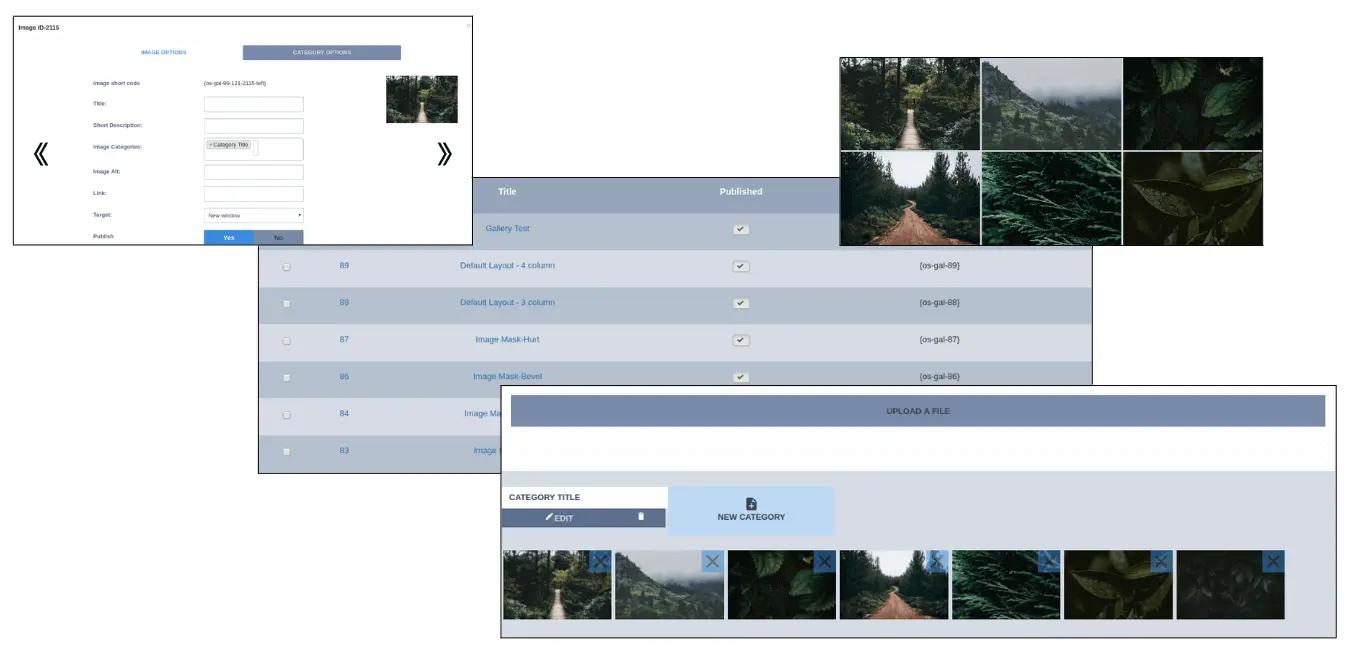
Intuitive and Easy Admin Area
Friendly admin panel allows you to create joomla gallery in a few minutes! You may add a number of images and categories in a single photo joomla gallery
Looks good on Every Mobile device
Ordasoft professional Joomla gallery is fully responsive - your images will look awesome no matter if they are on the desktop, mobile or tablet

Unparalleled Support Any time you need it
Our experts are always ready to respond any questions related to the problems with gallery and fix it quickly
Fully Joomla Gallery Optimization
You should know how important optimization is, so our Joomla Gallery is fully optimized! Traffic, speed and more. Also, Joomla Gallery works with free hostings


Free Hosting Support
OrdaSoft Joomla Gallery works excellent not only with professional hostings, but on a free hostings and share hostings too.
Awesome Hover Effects
Joomla Gallery has lots of fascinating hover effects, which allows you to create excellent site. Choose any effect from background changing to rotate images. Check it now!

Multi Language Support
We care about comfort of all our customers, so our Joomla Gallery is multi language
Drag And Drop Option
Add images to your gallery in a second. Just select what you want to add and drop it to the droppable palce


Video Support (YouTube, Vimeo)
Not only images, but video, gif and audio ewsponsive Joomla gallery supports too. It makes your gallery super flexible
700 000+ Happy Clients
We are always working hard to make our Joomla gallery better and to gain trust of our customers






Joomla Gallery works with popular Joomla Extensions





And that is not all of them, choose extensions you need and start creating a perfect website with our Responsive Joomla Gallery. If you have problems integrating Joomla Gallery just Contact Us.
Even More Features in Joomla Gallery
Features
Basic
Pro
Show Title and Description at image over
1 layout
6 layouts + sublayouts
Show Title and Description at image top
1 layout
6 layouts + sublayouts
Show Title and Description at image bottom
1 layout
6 layouts + sublayouts
Support jpeg, png, gif, webp - image file formats

Load speed optimization for backend and frontend, we have client with 1000+ images in one photo gallery and at one web page.
Images Drag & Drop upload
Support of FancyBox
Support Touch Slider in FancyBox
Upload photos from zip

Upload photos from folder
Responsive (Excellent view on mobile devices)
From HTML to Fancybox Support
Native Support of Youtube Video
Native Support of Vimeo Video
Social Share buttons (Facebook, Instagram, Twitter, Vkontakte, Odnoklassniki, Pinterest, Linkedin)
Photo Download button
Excellent Images Gallery Layouts
1 layout
6 layouts + sublayouts
Excellent Images Hover Effects
2 hover effects
12 hover effects
Display images effects
1 Display Images effects
20 Display Images effects
Unlimited images or photos
Unlimited categories of images
Unlimited joomla galleries of images
"Load More" Button, LazyLoad - unlimited images, but light site
"Load More by Scroll", LazyLoad - unlimited images, but light site
"Load More auto", LazyLoad - unlimited images, but light site
Copyright links
Multilangauge Support
Image Shortcode support
Images Category support
Free Support
Import settings from another OrdaSoft Joomla gallery
Images Ordering by Drag & Drop
Images Ordering by image upload date
Images Ordering by file title
Images Ordering by photo title
Basic
Free
Pro
$29
we support payment systems