OrdaSoft forum

wysiwyg-editor does not show its content (0 viewing)
 Favoured: 0
|
Wysiwyg-editor does not show its content


wysiwyg-editor does not show its content 2 Days, 12 Hours ago
Karma: 0
Since the update to the newest version: the WYSIWYG editor is no longer displaying the generated content. The developer tools show a class `col_box admin_aria_hidden`, and the embedded `div`—`text_textarea_22`— is set to `display:none`.
I was able to set it to `display:block !important` via CSS, but that shouldn't be the solution.
I was able to set it to `display:block !important` via CSS, but that shouldn't be the solution.
 Logged
The administrator has disabled public write access.

Re:wysiwyg-editor does not show its content 1 Day, 13 Hours ago
Karma: 102
Hello
Gor create "Text Editor field", you need in your OrdaSoft Joomla cck -> in "add layout" -> selected "editor" for your "add text area field".
Please check this for your layyout. Please check attachment.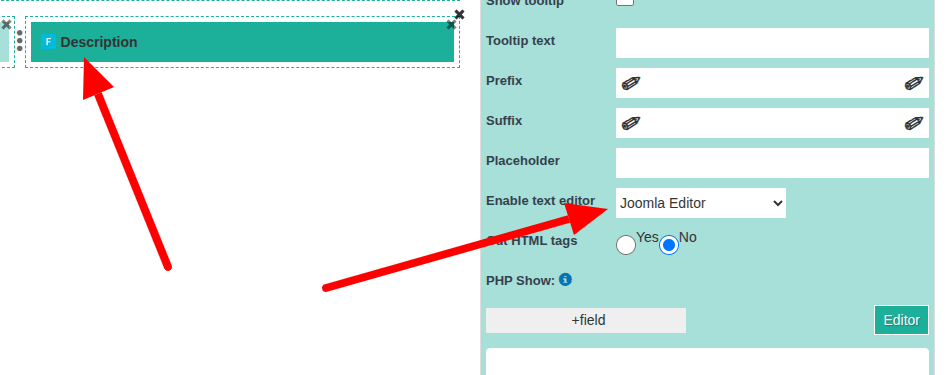
If for you here all good:
Could you give to us
full FTP and supper admin access
and our team will find solution special for You, FTP and admin access You can send to our contact form.
ordasoft.com/contact-us-form
We need:
Link to website.
Detail description: How reproduce error. Step by step. Detail description: how we may reproduce this.
Site Super Admin:
username
password
FTP:
FTP host
FTP username
FTP password
Regards,
OrdaSoft team.
Gor create "Text Editor field", you need in your OrdaSoft Joomla cck -> in "add layout" -> selected "editor" for your "add text area field".
Please check this for your layyout. Please check attachment.
If for you here all good:
Could you give to us
full FTP and supper admin access
and our team will find solution special for You, FTP and admin access You can send to our contact form.
ordasoft.com/contact-us-form
We need:
Link to website.
Detail description: How reproduce error. Step by step. Detail description: how we may reproduce this.
Site Super Admin:
username
password
FTP:
FTP host
FTP username
FTP password
Regards,
OrdaSoft team.
Logged
The administrator has disabled public write access.
Re:wysiwyg-editor does not show its content 14 Hours, 9 Minutes ago
Karma: 0
I have been using these fields for a long time. However, following the latest update, the content in the WYSIWYG editor fields suddenly disappeared—or rather, it appears for a second and then disappears.
I worked around the issue by setting the `div` with the class `col_box admin_aria_hidden` to `display: block !important`. This ensures the content is displayed once more.
I worked around the issue by setting the `div` with the class `col_box admin_aria_hidden` to `display: block !important`. This ensures the content is displayed once more.
Logged
The administrator has disabled public write access.
 |
we support payment systems