Categories in Joomla

Categories are one of the core building blocks of Joomla. They help you organize content, keep your website structured, and make it easier for visitors (and search engines) to find information. Whether you're running a blog, business website, or online catalog, understanding how categories work in Joomla is essential.
What Are Categories in Joomla?
In Joomla, categories are containers used to organize content such as articles, contacts, banners, or even custom items created by extensions. Just like folders that group related content together.
A blog website might have categories like News, Tutorials and Reviews.
A business website could use categories such as Services, Projects and Case Studies.
A real estate website may use categories like Houses, Apartments and Commercial Properties.
Categories can also be nested, meaning you can create parent and child categories for better organization.
Why Categories Are Important
Using categories properly helps you:
- Keep content well-organized;
- Create clean and logical menus;
- Improve user experience;
- Improve SEO and site structure;
- Manage large amounts of content easily;
How to Create Categories in Joomla
- Log in to the Joomla Administrator Panel.
- Go to: Content → Categories.
- Click New.
- Enter the category Title.
- Choose a Parent Category (optional).
- Add a description if needed.
- Click Save & Close.

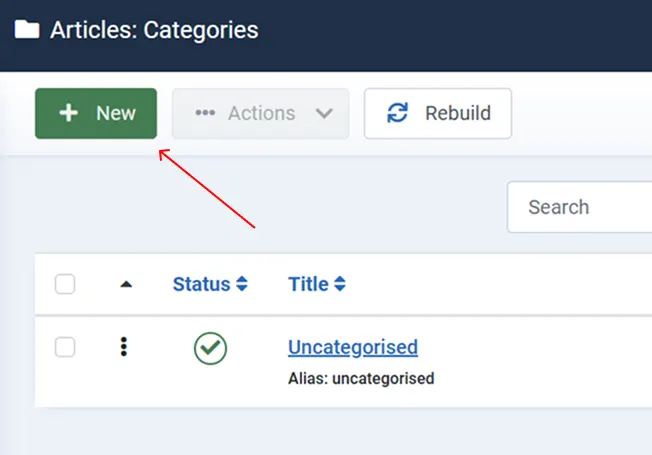


You can repeat this process to create multiple categories and subcategories.
How to Use Categories with Articles
Once categories are created, you can assign them to articles:
- Go to: Content → Articles.
- Click New or open an existing article.
- Select a Category from the dropdown menu.
- Save the article


Every article must belong to one category, which helps Joomla organize and display content properly.
Displaying Categories on Your Website
Categories become really powerful when combined with menu items.
Common Menu Options Using Categories:
Category Blog - Displays articles from a category in a blog-style layout.
Category List - Shows a list of articles in a category.
List of All Categories - Displays parent and child categories.
To create a menu link:
- Go to: Menus → Your Menu → New.
- Select a Menu Item Type.

- Choose a category-based layout.
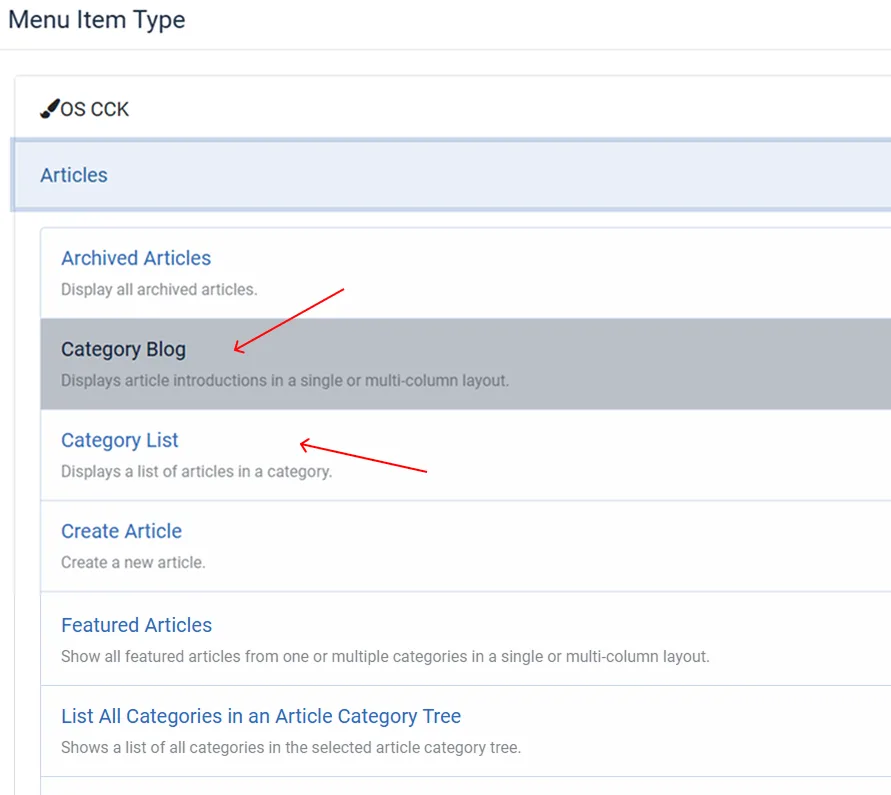
- Select the category you want to display.
- Save.
This allows visitors to easily browse your content by topic.
Learn More about Joomla Menu
Using Nested Categories
Joomla allows unlimited category levels, which is useful for larger websites.
Example:
Blog → Tutorials → Joomla or WordPress → News.
This structure keeps content clean and easy to manage, especially when your site grows.
Categories Beyond Articles
Categories are not limited to articles. Joomla uses them in: Contacts, Banners, News Feeds, Extensions (eCommerce, Real Estate, Portfolio, etc.)
Many Joomla extensions rely heavily on categories for organizing items, products, or listings.
SEO Benefits of Categories
Categories help with SEO by Creating logical URLs, Grouping related content, Improving internal linking, Making it easier for search engines to understand your site structure. Well-structured categories can improve rankings and user engagement.
Best Practices for Using Categories
- Don't create too many categories at once;
- Use clear and descriptive names;
- Plan your category structure before adding content;
- Use subcategories only when necessary;
- Keep category names SEO-friendly.
Categories are a powerful and essential feature in Joomla. They help you organize content, improve navigation, and build scalable websites that are easy to manage. Whether you're a beginner or an advanced user, mastering categories will make your Joomla site more professional, user-friendly, and search-engine optimized. If you plan your categories wisely, Joomla will handle the rest.