News
HeartBit - Joomla Creative Business Template
Hello again! This time we decided to surprise you by bright and unusual design of our new Joomla template HeartBit. You'll see creative business template for creative studios, small business companies, portfolio website and for those, who want the people on your website exclaimed: "Wow! The cool guys work there!" Heart Bit is ideal for anyone, who wants to share the bright pictures, video, who wants to present themselves bright and stylish.
HeartBit includes our lovely Joomla Slider, simple Joomla Gallery and awesome jQuery effects. You'll be able to download our template pretty soon at Joomla templates. While you can see it's screenshots. Good luck and stay with OrdaSoft!

Go to Download HeartBit
Add a comment10 Reasons Why You Will Love
Ordasoft Drupal Blank Theme
When starting make Drupal theme we usually don't want to worry about some basic features, like responsiveness and сross-browser compatibility and want to devote themselves to the development of the unique design.
For such kind of people we've created new base theme Drupal Blank Theme. With our Drupal base theme theming can be much faster and easier. It is very minimalistic in design, but have main features that help you to create awesome and unique Drupal website. But at the same time the Ordasoft Drupal Blank Theme is not oversaturated with features, it is easy to use and lightweight. The main purpose of Ordasoft Drupal Blank Theme is to enable you to make your own custom themes fast, focusing on developing design.
So let's have a look on top-10 advanced features of Ordasoft Drupal Blank Theme.
1. Responsive design.
Ordasoft Drupal Blank Theme adapts to different screen sizes to provide a presentation that is fit to different kinds of devices, such as mobile phones or tablets.

2. Cross-browser compatibility
Your users will receive a positive, user-friendly experience no matter what browser they are using
3. Lot of pre-defined regions
With help of this grid you can implement almost all incredible ideas. Ordasoft Drupal Blank Theme handles appearing and disappearing regions with ease. For example, sidebars will only appear if you place a block in them. When one or both sidebars are empty, content area will automatically widen to fill the empty space.

4. Logo image settings (upload, width)
Upload logo easily using feature of Drupal Blank Theme. Insert path to custom logo or use uploader and set width of the logo.

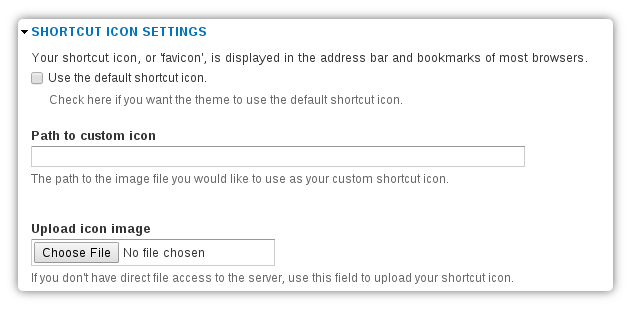
5. Shortcut image settings (favicon)
Upload shortcut image of "favicon" and this image will be displayed in the address bar and bookmarks on most browsers.
6. Links settings (body, main menu, top menu, footer)

7. Social Icons
11 social networks are presented in Drupal Blank Theme - Twitter, Facebook, Flickr, Linkedin, YouTube, Pinterest, Google+, Dribbble, Vimeo, Instagram and VK.

8. Typography
Use one of 25 fonts to individualize your Drupal theme.9. Body Pattern
Select one of proposed patterns - None, Stone, Lines, Rhombus, Noise or Cloth.
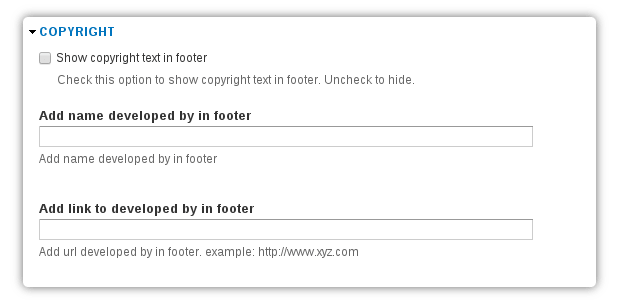
10. Copyright
Ordasoft Drupal Blank Theme gives developers an easy starting point and some basic features. We are sure that with our starter theme you will make unique first-class Drupal theme that could make your online business work better.
If you don't have time to create Drupal theme from a scratch you may choose one of our free and premium Drupal themes and customize them to your needs.
Download Drupal Blank Theme
EducationStreem - Joomla Education Template
Hello everyone! We want to share with you our new Joomla education template EducationStreem! It'll be available for download pretty soon. While you can see it's screenshots.
We have gathered all the best for those, who want to create an excellent website for universities, colleges, training companies and any organizations, which have a large catalogues of books. Yes, you understand right! We included our amazing Joomla component Book Library in EducationStreem. You'll be able to create your virtual library! Also we used the k2 Blog - favourite extension by all users.
In addition, you'll be able to output your events, to share your news articles with users, to display comments from the blog and to share your photos with helpness of our Image Joomla Gallery.
EducationStreem is ideal for creating websites any education school, from kindergarten to serious universities, corporate websites of companies, which will have oun blog and a library. Meet our EducationStreem and Download on OrdaSoft. See you!


Go to Download EducationStreem
Add a commentAre you scared?
Me too.... Halloween is coming!

Are you ready for spooky events and scary discounts?
In Ordasoft we give you 20% discount on all our stuff - Joomla, Drupal, WordPress themes and memberships.
Everyone can receive sale prices on Ordasoft products - all you need is use of coupon code - SCARY20.
The sale is split across 5 days, so hurry up and choose what you want to this Friday, October 31.
Have a frighteningly fun time with our Halloween party!
Happy Halloween!
Ordasoft team
OrdaSoft Wordpress Themes
become more dynamic and easy!
Wordpress Themes from OrdaSoft become more dynamic and easy! The key of success are Widgets and a lot of positions for Widgets in admin area of OrdaSoft Wordpress Themes.
In standard Wordpress Themes you can see Widgets - the function blocks, that can be placed in the few sidebars (column). The number of available sidebars, and positions for Widgets limited.
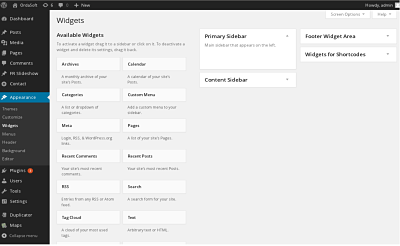
Now Go to Ordasoft Wordpress theme admin panel and go to the "Appearance" - "Widgets". In the center of the page shows all the currently available widgets, and right - used in the sidebars. We have created a large number positions for Widgets, that can help you in just a few minutes to create your dynamic and bright site. In all our wordpress business themes you can see the new possibilities of using Widgets and sidebars.
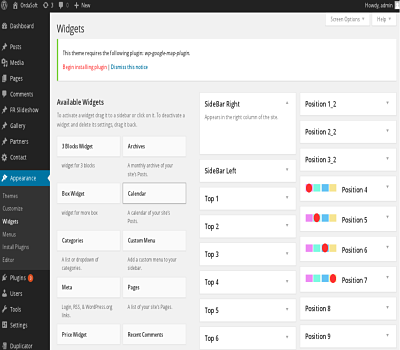
Let's see how it works. So the first thing we need to do, is go to the "Console wordpress" -> "Appearance" -> "Widgets" in front of us opens a window with the available wordpress widgets. View of the panel "Widgets" in different versions of wordpress can vary, but the essence is the same everywhere. On the right side of the tab widget is an area to add the widget, in other words by dragging widgets to this area, we just form the sidebar. In OrdaSoft Wordpress Themes - there are huge number of places, where you can drag and drop widgets. We'll take our new plugin OS Social Icons and put in any position, that we like in one page wordpress theme - BizOne. This can be done with others Widgets and you can put in any positions, and in any wordpress business themes from OrdaSoft.
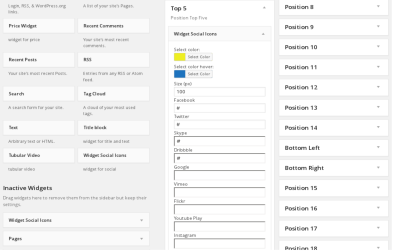
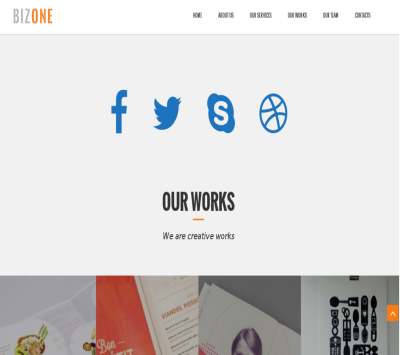
After we have selected the color for social icons, color hover and size (px), we can bring our widget on the frontend. Simple plugin OS Social Icons, which easy to customize, drag-and-drop, a lot of positions for Widgets - keys of lightness and dynamic. You can use any others plugins and install in any position. You can change the theme to suit your needs quickly and easily. We made Wordpress Themes more dynamic and easy.
Look at all OrdaSoft Wordpress Themes
Add a commentMore Articles...
Page 36 of 56
we support payment systems