News

Joomla Social Comment and Sharing
Joomla Share Module

Last update: September 2021

Joomla 3.9.x - Joomla 4.0.x

Rate it:

( 0 Votes )

Joomla Share is a light weight and simple to use social share Joomla module (plugin). Joomla Share Buttons will help you to increase your audience by engaging people from social networks as well as sharing content across multiple social networks and platforms. Facebook Social Comments Box and Disqus Comment Box in plugin enables users to comment on your website's content easily. Start to grow your business with Responsive social share Joomla module and bring your website marketing to the next level.

Most Powerful Features of Joomla Share plugin

Drag & Drop in Joomla Share

Drag & Drop

8 layots in Joomla Share

8 Layouts

Add this button in Joomla Share

AddThis Button

Comment boxes in Joomla Share

4 Comment Boxes

Google analytics in Joomla Share

Google Analytic

Button size in Joomla Share

Unlimited Button Size

3 Button style in Joomla Share

3 Button style

Easy to use Joomla Share

Easy to Use

Core Features
of Social Share Buttons Joomla Module(plugin)

Layout

  • top
  • right
  • bottom
  • left
Horizontal Layout in Joomla Share

Horizontal Layout

Vertical Default Layout in Joomla Share

Vertical Default Layout

Layout Bottom in Joomla Share

Layout Bottom

Joomla Share plugin with horizontal default layout

Horizontal Default Layout

Joomla Share plugin with left layout

Left Layout

Joomla Share module with top layout

Top Layout

Vertical Layout in Joomla Share

Vertical Layout

Joomla Share plugin Right Layout

Right Layout

Joomla Share module(plugin) includes 8 awesome layouts and fantastic Joomla social share buttons (Round, Square, Tongue), so you can place them anywhere on your website. Joomla Share also includes preview of layouts in backend. Joomla Share has original Joomla share buttons (Facebook Like button; Facebook share button; Twitter share button; LinkedIn share button; VKontakte (VK) share button; Odnoklassniki (OK) share button), Instagram Follow Button, Pinterest Follow and Share Buttons, Tumblr Share Button, AddThis.
Joomla Share buttons also have responsive design, multilanguage options, counter option and settings for changing share buttons size. All these features make Joomla Share a powerful tool for integration of your website with social networks.

add social share button in Joomla Share

AddThis Social Share
in social share Joomla module

AddThis Social Share is one of the web's leading social tools. Promote your content easily by share to over 200 of the most popular social networks (like Pinterest, Google+, WhatsApp, LinkedIn and more). Clean, customizable and simple social buttons are unobtrusive, quick to load and recognized all over the web. AddThis Social Share is everything you need to connect with almost all social networks on Joomla website.

Button Style
of social share buttons Joomla Plugin(Module)

We added an ability to select the shape of the button. Joomla Share allows you to choose one of the 3 button style: Round, Square, Tongue shape. Accordingly you can use our Joomla Share for any website design.

select the shape of the button in Joomla Share

Button Size
of Social Share Buttons Joomla Module(plugin)

Joomla Share Buttons allows you to select the desired button size. You can place on your website a few large buttons or many small size buttons. All of this is easily configured in the admin panel. Therefore you will not have problems with the placement of the Social Share Joomla module and it will be suitable for any website.

large size of Joomla share buttons icon in Joomla Share
average size of buttons icon in Joomla Share
size of buttons icon in Joomla Share
small size of buttons icon in Joomla Share
other size of buttons icon in Joomla Share
tiny size of Joomla share buttons icon in Joomla Share

Drag & Drop
in Joomla Share

Drag and Drop feature of Joomla Share plugin helps you to drag social buttons in admin area into the order you like, then just click the save icon and your items will be reordered. No coding skills needed, just intuitive creation of interface with drag and drop capabilities. Organize social buttons easily with Joomla Share.

Joomla Share
Facebook Application ID in Joomla Share

Facebook Application ID
of social buttons Joomla module(Facebook plugin)

Facebook Application ID helps to ensure that the correct product image, product name, and product description continue will be shared in the event of some feature changes. Take your Joomla website marketing to the next level with Facebook Application ID. When you provide this developers option, this Facebook module enables you administer Facebook Pages for products (where you can share product updates and engage with customers who have "Liked" a product). Choose Joomla Share and start making your website social.

Google Analytic
in Joomla Share module

Joomla Share extension is integrated with Google Analytic tool. Your analytic dashboard will base on the actual clicks using the social share buttons. A summary of your most shared content is added to the dashboard, as well as the numbers and networks of the last days. Be more social with Joomla Share, check Sharing Statistics and how popular your content among visitors of Joomla website.

Google Analytic integration in Joomla Share

XPath Integration
in Joomla Share

XPath is powerful developer tool for sharing your content. XPath uses path social plugin expression to select nodes or node-sets in an XML document. The node is selected by following a path or steps. You will be able to share with any image from your website with your friends. Make your content an immediate hit by sharing it with Joomla Share.

Joomla Share

What our clients are saying?

With more than 10 years of development, 100.000+ downloads and thousands of happy customers
worldwide we are confident in the quality of our product. See what our clients say about Joomla Share.

"Very good, I had no problems with the functioning of this extension. Ordasoft has one of the best supports around. I have purchased many different Joomla extensions and plugins, and their support is top notch! They have extensive demos with descriptions and documentation included."

Peter

"Functionality is great, full of features. I need to say that support is awesome, had some problems with my site(mainly it was a script clash) but they fixed it. Great support."

Dilum Tharaka

"An module for social sharing your pages. Excellent support. Available on website and e-mail support is excellent."

Monique
We are at joomla.org
Responsive Design
>Responsive Design Joomla Share
Responsive Design Joomla Share
Display the Buttons in any Order You Choose
Responsive Design Joomla Share
Facebook Moderation Settings
Responsive Design Joomla Share
Google Analytic Integration
Responsive Design Joomla Share
Fantastic Icon Types (Round, Square, Tongue)
Responsive Design Joomla Share
Sharing Counter
Responsive Design Joomla Share
Multi Language Settings
Responsive Design Joomla Share
8+ Awesome layouts
Responsive Design Joomla Share
AddThis Social Share
Responsive Design Joomla Share
Advanced Share Buttons configurations
Responsive Design Joomla Share
XPath Integration for Images
Responsive Design Joomla Share
Control settings for Sharing Buttons size
Responsive Design Joomla Share
Facebook Application ID(for configure Facebook module part
Responsive Design Joomla Share
Facebook Share Button for configure Facebook module part
Responsive Design Joomla Share
Facebook Like Button for configure Facebook module part
Responsive Design Joomla Share
Facebook Send Button for configure Facebook plugin part
Responsive Design Joomla Share
Twitter Share Button
Responsive Design Joomla Share
Google+ Share Button
Responsive Design Joomla Share
VKontakte Share Button
Responsive Design Joomla Share
Odnoklassniki Share Button
Responsive Design Joomla Share
AddThis Button
Responsive Design Joomla Share
Instagram Follow Button
Responsive Design Joomla Share
Pinterest Follow and Share Buttons
Responsive Design Joomla Share
Tumblr Share Button
Responsive Design Joomla Share
LinkedIn Button
Responsive Design Joomla Share
Disqus Comment Box
Responsive Design Joomla Share
Facebook Comment Box for configure Facebook plugin part
Responsive Design Joomla Share
VK Comment Box
Responsive Design Joomla Share
Google+ Comment Box
Responsive Design Joomla Share
Support Open Graph Tags
Responsive Design Joomla Share
Live backend preview of icons
Responsive Design Joomla Share
Supports these third party components: K2, VirtueMart, JEvents, MyBlog, EasyBlog, DJ-Classifieds, JEvents, Acymailing
Responsive Design Joomla Share
Comments and Sharing can be easily positioned in any part of Joomla article
Responsive Design Joomla Share
Requests and Posts: All activities can be managed and monitored
Responsive Design Joomla Share

Social Share Joomla Module Settings

Post comments and share Joomla pages through most popular social networking sites Joomla Share

Joomla Facebook share button options for configure Facebook module part

Joomla Share (Facebook plugin part) for post comments and share

Twitter share button Options

Joomla Share for post comments and share Joomla pages through Twitter share button

Linked In share button Options

Joomla Share for post comments and share pages through LinkedIn share button

VKontakte share button Options

Joomla Share for post comments and share Joomla pages through vkontakte share button

Odnoklassniki share button Options

Joomla Share extension for post comments and share Joomla pages through Odnoklassniki share button

AddThis Options

Joomla Share extension for post comments and share Joomla pages through add this options

1. How To Install Joomla Share module?

2. How to manage Joomla Share module

PRO, Free version 2.5


  • 01. Updated FaceBook SDK
  • 02. Changed CSS
  • 03. Speed Optimization

PRO, Free version


  • 01. Joomla 3.9 support
  • 02. Changed CSS
  • 03. Correct title for FaceBook sharing

PRO version


  • 01. Added FaceBook Share link as setting. User may set link which he want share
  • 02. Changed CSS

PRO version


  • 01. Added Google Analytic Integration
  • 02. Added Facebook Moderation Settings

PRO version


  • 01. Added 3 Comment Boxes (Disqus, VK)
  • 02. Added Share and Follow buttons (Instagram, Pinterest, Tumblr)
  • 03. Added 3 Icon Types (Round, Square, Tongue)
  • 04. Added new update algorithm

PRO version, 07 October 2015


  • 01. Fixed Facebook module sharing. Now image is pulled out from the first sharing (with help of Xpath option).

Comments & Sharing Joomla Module

Get Started with social share Joomla module Today!

Basic
FREE
  • Facebook Like button (Facebook plugin part)
  • Facebook Share button (Facebook plugin part)
  • Facebook Comment box (Facebook plugin part)
  • Twitter Share button
  • VKontakte Share button
  • Odnoklassniki share button
  • Instagram Follow Button
  • Pinterest Follow and Share Buttons
  • Tumblr Share Button
  • LinkedIn Button
  • AddThis button
  • 2 Layouts
PRO
$25
Basic Features
  • 8+ Layouts
  • 3 Icon Types
  • 4 Comment Boxes
  • Responsive Design
  • Drag & Drop
  • MultiLanguage
  • Sharing Counter
  • Google Analytic Integration
  • Facebook Moderation Settings
  • Super Flexible Backend
  • Without copyright links
  • Free Support
Add a comment
 

OMG! Summer is coming

26% off on all OrdaSoft products

Summer's soon! Are you ready for summer nights, vacation, beach, fun, lazy days and fresh air? We are ready =)

But before you plunge into the summer fun, we offer you to think about work for the last time. Today we are glad to announce a discount in OrdaSoft store.

Receive an immediate 26% discount on all our products, including Joomla templates and extensions, Drupal and WordPress themes.

Also joining to our clubs is extremely affordable now. Where else you can grab 100+ responsive Joomla templates with included functionality only for $66.6? Only at OrdaSoft and only up to the end of this month. So don't wait, this offer is valid only up to May, 31st. Coupon Code: OMG26OFF


  1. Discount: 26%
  2. Coupon code: OMG26OFF
  3. Valid to: May, 31st

Awesome moment to get more at a lower cost! Don't miss it, time is limited =)


With Best Wishes,

OrdaSoft team

Add a comment
 

Release of Real Estate Manager v.3.8

new features and security improvements

Release of Real Estate Manager v.3.8

We are glad to present version of Real Estate Manager with new features, that were awaited by many our clients, like changing browser title and making Search module more flexible. So let's have a look at changes made in Real Estate Manager v.3.8:

1. Changed behavior of Browser Page Title

Ability to change browser page title in Real Estate Manager

In new version of Real Estate Manager 3.8 we've changed the behaviour of browser page title creation. Now it displays the menu title by default and also it's possible to change browser page title in tab Page Display when edit menu item.

02. Added Captcha for Booking and Sales forms

Captcha for Booking and Sales forms in Real Estate website software

In Settings of Real Estate Manager v.3.8 (Administrator Settings) you can enable Captcha for booking and contact forms displayed on the properties description pages. Also this option can be applied for selected Joomla user groups.

03. Added new update algorithm

New update algorithm in property management software for Joomla

The update algorithm was modified and now you can clearly see the version of Real Estate Manager in About section.

04. Fixed bug with breadcrumbs

05. Updated security algorithm

We've added protection against SQL injections to Real Estate Manager. SQL injection is a technique in which an attacker inserts malicious code into strings that are later passed to a database. To avoid such injections were made a set of works so that Real Estate Manager v.3.8 is more secure.

06. Updated Module Search for Real Estate Manager

New update algorithm in property management software for Joomla

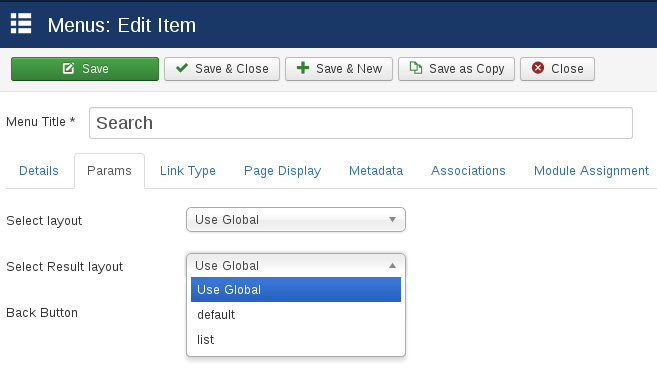
In Real Estate Manager v.3.8, all fields from Advanced Search are configurable, you can show or hide any field and choose whether search will be applied for this field or not.

07. Updated Google Location Map for Real Estate Manager (Layout with search)

Google Location Map for Real Estate Manager (Layout with search)

Now it's possible to set the default address, range and category. Also you can specify selected property in Location Map with Search with help of its ID.

08. Added fully support of sh404SEF component

Now sh404SEFplugin is encorporated in Real Estate Manager v.3.8, so you don't have to install it separately. After installing sh404SEF component you'll be able to use it for pages generated by Real Estate Manager.

Fully support of sh404SEF component

Please note:

Members of Developer membership plan can download the new version in Home -> Downloads -> Ordasoft Club Downloads -> Joomla Extensions Downloads -> Real Estate Manager for free. Please log in first.

If you have already bought extension and want to get the new version, contact us and we'll send you a 50% discount coupon on the Real Estate Manager v.3.8.

PLEASE NOTE:
Before making any upgrades, make the backup of your website (files, folders and database). At first please check upgrade/update process at the test website!
If you have custom changes of component, you can lose your changes. Please, in that case do not make update or contact us and we'll help you with update.


Also all templates in which Real Estate Manager was used, are upgraded to the latest Joomla v. 3.5. Check out the Joomla templates with Real Estate Manager integrated here:

Add a comment
 

Book Library v.3.6

new features and security improvements

Book Library website software v.3.6: new features and security improvements

We are glad to introduce you Book Library v.3.6. The latest version of Book Library includes a bunch of new useful features and fixes:
1. Added protection against sql-injection
2. Added the ability to assign multiple authors to book
3. Added the ability to edit books from frontend
4. Fixed Search in backend
5. Fixed icons of PDF, print and email
6. Added option what Joomla user group can edit books from frontend
7. Fixed bug with RSS
8. Checked compatibility with Joomla 3.5

Let's look at them in details.

1. Added protection against SQL-injection

SQL injection is a technique in which an attacker inserts malicious code into strings that are later passed to a database. In new version we've found vulnerabilities and added protection against them.

2. Added the ability to assign multiple authors to book

Now it's possible to connect book with two or more authors.

Multiple authors

3. Added the ability to edit books from frontend

In new Book Library v. 3.5 it's even more comfortable to handle books via frontend. To existing options for books management (add/delete/publish/unpublish/rent/return from rent) were added ability to edit own books from frontend area. So users, moderators and administrators can easily manage books and requests without entering the administration panel.

Edit books from frontend

4. Fixed Search in backend

After upgrading to Joomla 3.5, there were slight issues with backend Search. We've checked all Search fields and corrected wrong ones.

Other improvements in Book Library v.3.6 includes views of PDF, print and email icons, fixing bug with RSS and adding access option for editing books from frontend.

PLEASE NOTE:
Before making any upgrades, make the backup of your website (files, folders and database). At first please check upgrade/update process at the test website!
If you have custom changes of component, you can lose your changes. Please, in that case do not make update or contact us and we'll help you with update.


Also we've updated all templates in which Book Library was used. Now they are fully compatible with the latest Joomla 3.5. Check out the Joomla templates with Book Library integrated here: Add a comment
 

Joomla 3.5 Released

OrdaSoft extensions are being tested

Joomla 3.5 Released

We would like to congratulate all Joomla users and developers with long-expected release of Joomla 3.5. Almost a year passed from the release of Joomla 3.4 and all Joomla were waiting for new version impatiently. So what we can expect from Joomla 3.5?

Among the most important updates in recently released Joomla 3.5 version is the support of PHP 7 that will increase the speed of Joomla websites. Other new features and updates of Joomla 3.5 include:


  1. Ability to add a user CSS file to Protostar
  2. Added site and admin links to module user
  3. Article counts in the Category Manager (shows the number of published, unpublished and trashed articles)
  4. Random category blog and list order
  5. Added ability to insert Modules easily in Articles with button on the editor toolbar
  6. Drag and Drop Images via default TinyMCE editor
  7. Read more about Joomla 3.5 version

So now Joomla users, administrators and developers will benefit from updating to Joomla 3.5.

One more great news for OrdaSoft club members. We've checked our extensions Real Estate Manager, Vehicle Manager and SEF Translate and can assure you that all them works correctly on Joomla 3.5. In the nearest time we will check all other extensions and Joomla templates to make sure they work perfectly on the latest version.

If you have any problems with updated extension or template do not hesitate to contact our support team. Please do not forget to make back up before updating, this can save you a lot of work and time.


Best Regards,

OrdaSoft team

Add a comment
 

Page 26 of 54

»